Accounts PayablePay partners what you agreed, once.
Accounts Payable is the money-out desk.
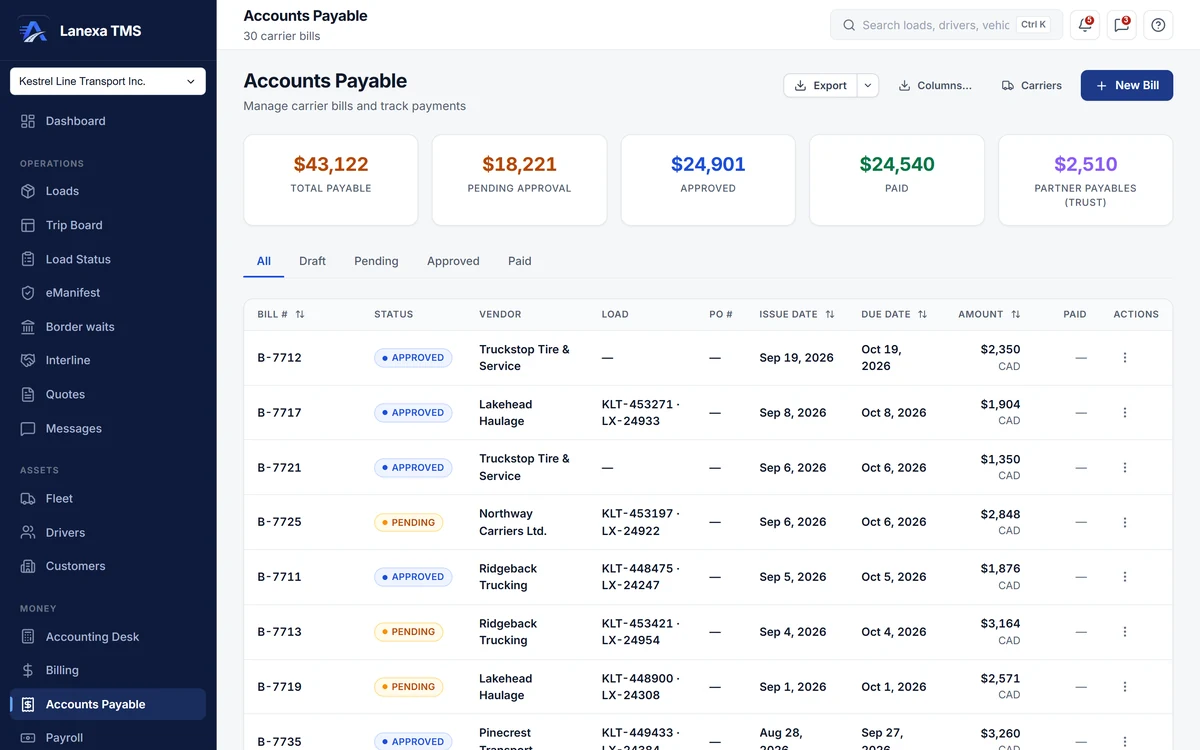
- Approval kept separate from payment
What it does
Held when it is above the rate con
Picking the load captures the agreed rate. A bill that comes in above it is held and cannot be approved until someone with approval rights accepts the difference with a written reason, recorded with their name — wherever the approval is attempted.
Entering and approving are separate
A bill moves from draft to pending to approved to paid. Approving is its own permission, and the database refuses an approval from a role that does not hold it. Three days after approval the bill's financial fields freeze; a later change needs a written reason.
Partner bills arrive on their own
When an interlined load is delivered and its POD is on file, the partner carrier's bill is created for you at the agreed buy rate, pending approval, with their payment terms, quick-pay offer and any factoring notice in the notes.
Partner money kept apart
A separate Partner Payables tile shows money you have collected for loads a partner hauled and have not yet paid out, so it is never mistaken for working capital.
Payments that cannot overpay
Record a cheque, ACH, wire, card or cash payment against an approved bill. A part payment keeps the balance open, a short payment takes a reason, an amount above the balance is refused, and the bill turns paid when it is settled in full.
Know who you are paying
Link a bill's typed vendor name to a carrier record once, and every other bill from that exact name follows. The carrier register shows each party's latest FMCSA answer.
The detail, when you want it
Everything live in Accounts Payable12
- Money tiles for total payable, pending approval, approved and paid
- Status tabs and a sortable register with per-currency totals
- Charge lines coded to your chart of accounts
- Bills in US or Canadian dollars, with the exchange rate stamped at the issue date
- The carrier's invoice, POD and receipts attached to each bill
- One-way push to QuickBooks Online as a Bill, without creating duplicates
- Payables aged in five buckets on the Accounting Desk
- A queue of held bills with Accept difference on the Accounting Desk
- Excel or CSV export of the filtered register
- Deleting a bill reverses its ledger postings and is logged with your name
- Each bill and each payment written onto the load's timeline
- Links from a ledger posting straight to its bill
Which plan includes itAccounts payable — bills, approval, payments, the rate-confirmation check and the Accounting Desk payables queue — is on Start and up.
QuickBooks Online push is on Start and up. Partner bills arrive automatically where Interline is included, on Fleet and up, and approved bills can be read in the general ledger on Fleet and up. Compare plans
How we count217 live capabilities of 225 catalogued.
Each capability is one control, field, tile, column or disclosed number, counted one by one. The registry
What happens when a carrier bills more than the rate confirmation?
The bill is held. It cannot be approved from any screen until someone with approval rights accepts the difference and says why, and that reason stays on the bill with their name.
Held bills are listed together on the Accounting Desk.
Does Lanexa pay the carrier?
No. You pay the carrier the way you do today — cheque, ACH or wire — and record the payment against the bill with its reference.
Lanexa keeps the balance, the status and the history.
Do carrier bills go to QuickBooks?
Yes, on Start and up. A bill is pushed one way into QuickBooks Online as a Bill, with the vendor found or created and an existing matching bill adopted rather than duplicated.
Changes made in QuickBooks do not come back to Lanexa.