PayrollDriver pay built from the work that ran.
Driver pay changes every week: by the mile, by a share of revenue or by the load, plus detention, stops and per diem, less fuel and advances.
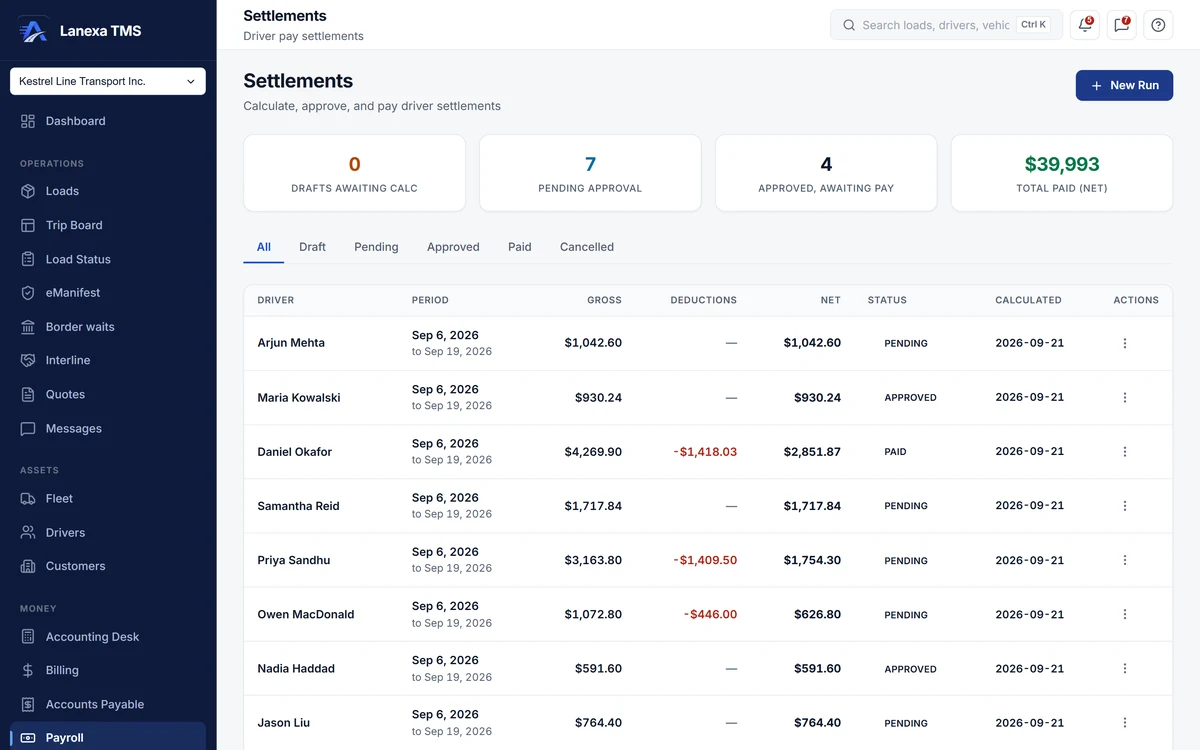
- Every run is reviewed, approved, then paid
What it does
Pay follows delivery
Calculate sweeps the loads a driver delivered in the period and the trips they finished. Undelivered freight is not paid, cancelled and TONU loads are left out, and each per-mile line says whether it was paid on typed, routed or ELD miles.
Every rule, itemised
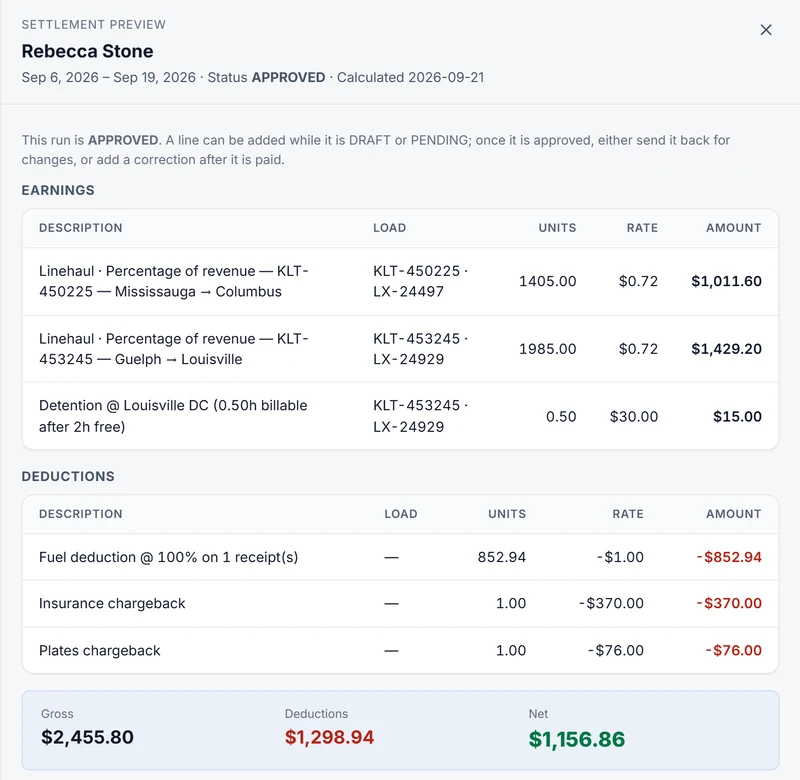
Pay by the mile, by a percentage of revenue, by the load or as a salary, with detention beyond the free hours, stop pay, per diem by calendar day and a guaranteed weekly minimum. Every line shows units × rate = amount, so a driver can check the arithmetic.
Two people sign off
The person who created a run cannot approve it; the database refuses. Approval shows what changed since the driver's last run and asks the approver to confirm the driver, the line count and the net before the pay stub is created.
Deductions that stay fair
Take an agreed percentage of approved fuel receipts and recover advances. Receipts still awaiting review are never deducted, and fuel-card statements import from CSV with a saved column mapping for each vendor.
Paid is final; corrections go forward
A paid run is closed. A correction becomes a new line on the driver's next run, and lines added by hand before approval survive a recalculation. Pay lines that were never collected can be claimed onto a run, so nothing is quietly left unpaid.
Escrow, loans and charge-backs
On Fleet, keep escrow accounts that stop at their target, loans that never repay below zero, and owner-operator charge-backs for insurance, plates, truck lease and an admin fee. Balances move only when a run is paid, and a team load cannot be paid until its split is chosen.
The detail, when you want it
Everything live in Payroll12
- A settlement worklist: drafts, pending approval, approved awaiting pay, total paid
- Overlapping runs for the same driver refused
- Earnings and deductions previewed before approval
- Extra accessorial, reimbursement or deduction lines, each with a reason
- Mark paid with a cheque, ACH or wire reference
- Cancelling a run voids its stub and releases its lines
- A settlement statement PDF on your letterhead, filed in Documents
- Fuel receipts entered in gallons or litres
- A plain-language summary of each driver's pay on their own record
- Pay-stub register export to Excel or CSV
- Batch pay runs and a payroll bureau export from the Accounting Desk
- Every change to pay records written to the activity log
Which plan includes itDriver pay — settlement runs, pay stubs, fuel receipts, the settlement statement, and the Accounting Desk pay run and payroll export — is on Start and up; on Solo it shows as a locked upgrade.
Payroll ledgers (escrow, loans and owner-operator charge-backs) and team-driver pay splits are on Fleet and up. Compare plans
How we count203 live capabilities of 207 catalogued.
Each capability is one control, field, tile, column or disclosed number, counted one by one. The registry
Are drivers paid per trip or per load?
Per load. A settlement run pays on the loads the driver delivered in the period, whatever trip carried them.
Finished trips supply the stops, dock times and days that drive detention, stop pay and per diem.
Can one person create and approve a settlement?
No. The database refuses an approval by the person who created the run, so every settlement has two people on it.
Marking it paid is a separate permission again.
Does Lanexa calculate payroll taxes?
No. Lanexa calculates gross pay, deductions and net pay for each driver.
Statutory deductions and year-end slips stay with your payroll provider, and the Accounting Desk exports a bureau file with names, the pay breakdown and the GL code.