InterlineKeep the customer, buy the wheels.
When a truck breaks down, the week is full, or a leg is out of your legal reach, you keep the customer and the invoice and hand the haul to a partner carrier.
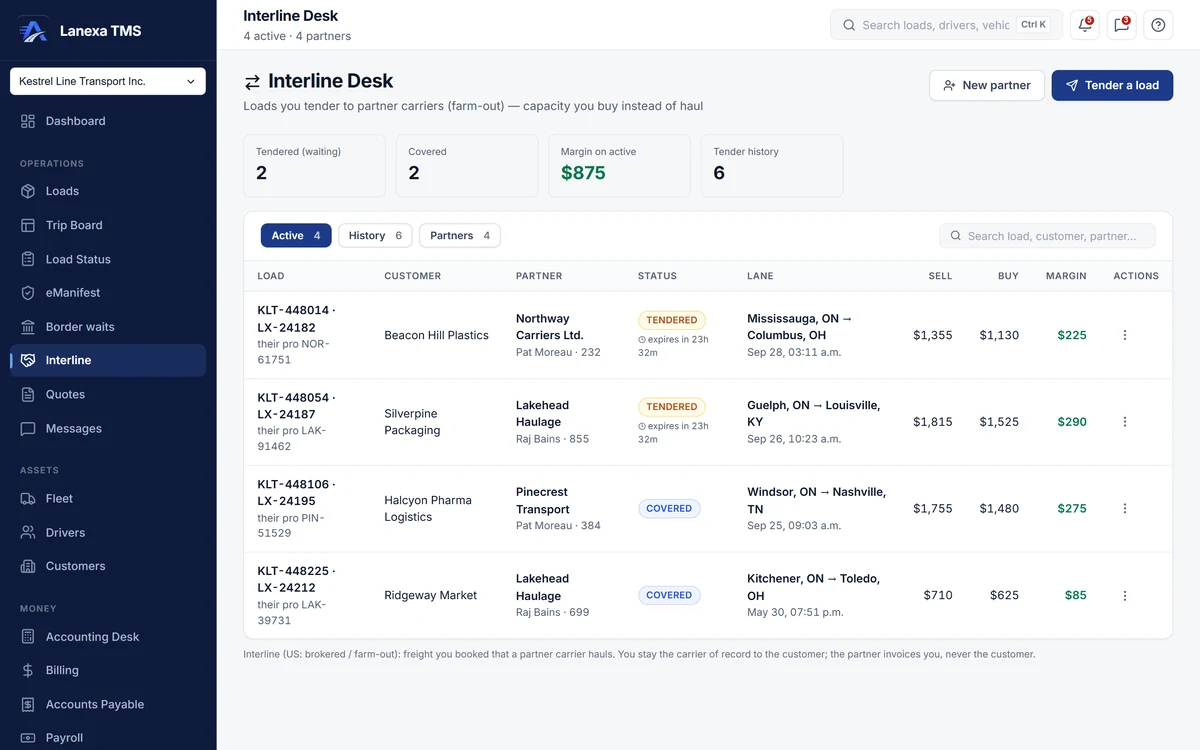
What it does
Tender with a clock
Pick a load with no driver on it and an active partner, type the buy rate and see sell minus buy before you commit. Give the offer 2, 4, 8 or 24 hours, or mark it already covered when the partner said yes on the phone. The countdown turns red when time is up, and you mark the tender expired.
Rate confirmation, emailed and filed
Generate an interline rate confirmation naming both carriers, the partner's USDOT, MC, SCAC and CBSA codes, the lane, the all-in rate and the payment terms. Its terms have the partner invoice you only, forbid re-brokering without your written consent and require a signed POD before payment. Email it with the PDF attached and the copy is filed on the load.
The partner's bill writes itself
When the load is delivered and a POD is on file, the partner's bill is created in Accounts Payable as pending — due on their terms, carrying their factor's remit-to when a notice of assignment is on file, with a line naming the lane. A person still approves it, and one tender can never produce two bills.
Your driver stays off their load
A farmed-out load shows an INTERLINE badge on every board, and Lanexa refuses to put your driver or truck on it — so nobody on your payroll is paid for a trip a partner ran. The partner's cost is counted once in margin, not twice.
Hand over mid-journey
Interchange a load that is already rolling: name the hand-over point, record the trailer drop, release your driver and truck, and make the partner the carrier in one flow. If no trailer-interchange agreement is on file, or it has expired, you acknowledge the warning first and it is noted on the tender.
A partner file that warns you
Keep authority numbers, SCAC, CBSA code, CVOR, CTQ, insurance and interchange-agreement expiries, payment terms, quick-pay and factoring on each partner. Chips warn when insurance is missing, expires within 30 days or has expired, or when a code the border needs is missing. They warn; your dispatcher decides.
The detail, when you want it
Everything live in Interline12
- Four tiles: waiting on a partner, covered now, margin on active coverage, closed
- Active, History and Partners tabs with one search box
- Find a tender by partner, load number, probill or customer
- Border warnings when a partner lacks the SCAC or CBSA code a crossing needs
- Record that the partner files the border crossing, with their PAPS or PARS number and port
- Stamp "partner crossed the border" in one click
- Every outcome kept: declined, expired, bounced, completed, cancelled
- Re-tender a load from its history — a new record, the old answer kept
- Each tender step written on the load's journey, with the partner named
- Onboard a new partner without leaving the tender
- Download the rate confirmation PDF without sending it
- Pay the partner in CAD or USD
Which plan includes itThe Interline Desk is on Fleet and up: tendering, rate confirmations, the partner file, mid-journey interchange and the automatic partner bill.
How we count301 live capabilities of 319 catalogued.
Each capability is one control, field, tile, column or disclosed number, counted one by one. The registry
Who invoices the shipper on an interlined load?
You do. You stay the carrier of record, and the rate confirmation has the partner invoice you only, never your customer.
Your customer's invoice is written when the load is marked delivered, exactly as on any other load.
When is the partner's bill created?
When the load is delivered and a POD is on file — in whichever order those happen — or when you mark the coverage completed.
It lands in Accounts Payable as pending for a person to approve, due on the partner's terms, or net 30 if none are set.
Can I stop tenders to a partner whose insurance has lapsed?
Not as a hard block, by design: the partner's file shows a red chip when insurance is missing or expired, and the dispatcher decides.
Lanexa does refuse two things outright — tendering a load that still has your driver on it, and a second live tender on the same load.