QuotesPriced from your own lanes, accepted without an account.
A quote is where the money starts: a lane, a price and a date it is good until.
What it does
Price from your own history
As you type the lane, the quote builder shows how many loads you have run on it, the average rate and rate per mile, the last three rates with their dates, what this customer paid there before and your win rate on that lane. It warns when your rate is 10% or more off that reference, or below your own cost-per-mile floor — a warning, never a block.
Your customer accepts online
Email the quote with its PDF attached, or copy the link. Your customer opens it on any phone with no account, passes a quick security check, ticks any optional services — the total updates as they do — and accepts with their name, email and a tick confirming they may accept for their company. You can revoke a link at any time.
An acceptance you can show later
An online acceptance is recorded with the person's name and email, the exact time, the internet address it came from, the agreed amount and the consent sentence they ticked. The quote's detail card shows it, and the quote PDF prints it in an acceptance box.
The accepted quote becomes the load
When the customer's credit is clear and the quote carries a target pickup date, acceptance creates the load by itself — lane, equipment, weight, rate, fuel surcharge, freight items, pre-agreed accessorials and notes carried across. Otherwise the acceptance is parked and your dispatcher is alerted to convert it. Dispatch is still a separate step.
Charges agreed before the haul
Add fuel surcharge, accessorial and discount lines, each with the exact condition that triggers it — "after 2 hours free" — and mark any line "if incurred". Optional charges stay out of the binding total and print in their own block on the PDF; the agreed ones, and any optional ones your customer ticked, carry onto the load's charges.
No quote goes quiet
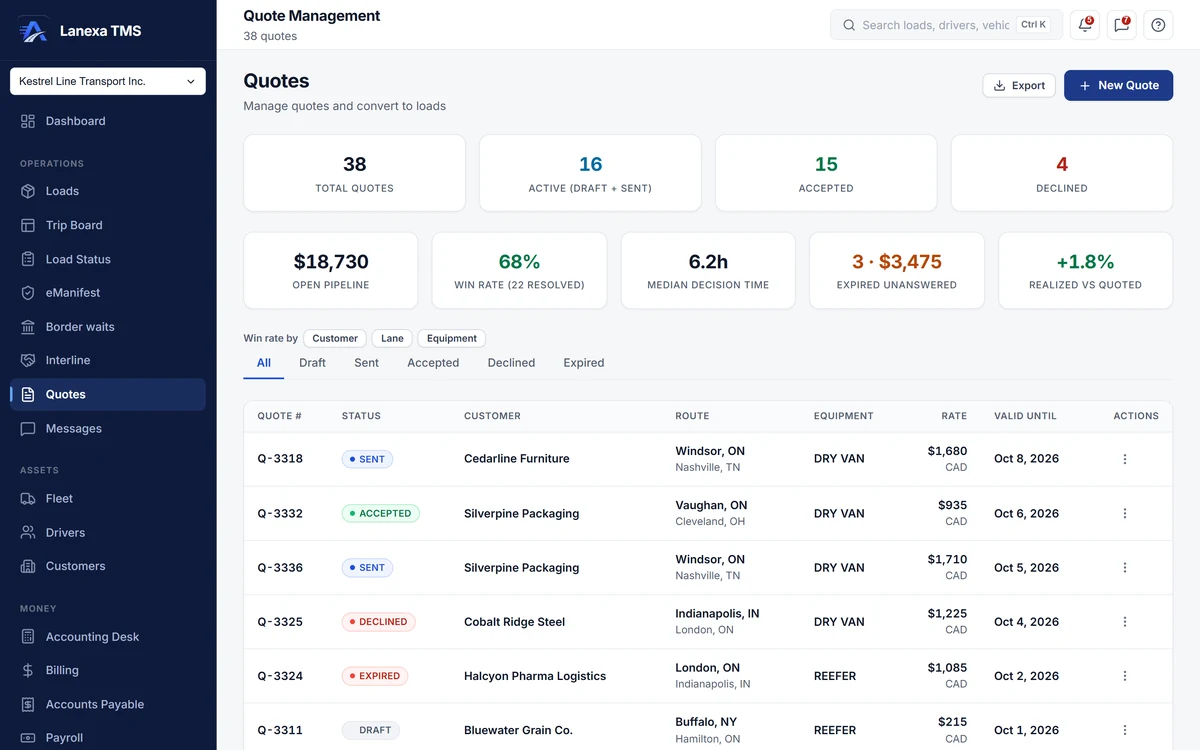
The moment a quote is sent is stamped, it expires on its own when its date passes, and your dispatcher is warned 48 hours before. The desk shows open pipeline per currency, win rate, median time to a decision, the value lost to expiry, and how the load you ran compared with the price you quoted.
The detail, when you want it
Everything live in Quotes12
- Sequential quote numbers reserved for you, or type your own
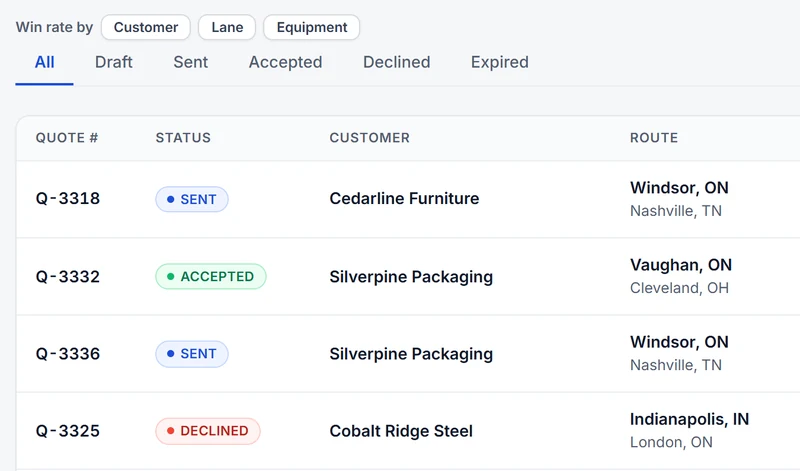
- Status tabs: all, draft, sent, accepted, declined, expired
- Win rate by customer, by lane or by equipment
- Rate-card suggestions that fill the rate and the fuel surcharge
- Freight items with PO numbers, package types, quantities and weights
- Destination tax preview on the quote before it goes out
- A cross-border prompt to add a customs line
- A reason required whenever a quote is declined
- Status history on every quote: from, to, who and when
- An alert the moment a customer accepts online
- Customer-ready PDF with itemised charges and an "if incurred" block
- Export the quote list to CSV
Which plan includes itQuotes is on Start and up, and it comes whole: the quote builder, lane pricing, the win-rate funnel, email delivery and the public acceptance page.
How we count216 live capabilities of 224 catalogued.
Each capability is one control, field, tile, column or disclosed number, counted one by one. The registry
Does my customer need an account to accept a quote?
No. They open the link from your email on any phone or computer, pass a quick security check, and accept with their name, email and a tick confirming they may accept for their company.
The name, email, time, internet address and agreed amount are recorded on the quote.
What happens after a customer accepts?
If their credit is clear and the quote has a target pickup date, Lanexa creates the load straight away with the lane, freight, rate, fuel surcharge and agreed accessorials.
If not, the acceptance is parked and your dispatcher and administrator are alerted to convert it by hand. Dispatching the load is still its own step.
Will Lanexa tell me if my price is too low?
It compares your rate with what you have charged on the same lane and warns when it is 10% or more off.
It also checks the all-in rate per mile against your company's cost floor — a published industry default until you set your own — and shows any shortfall in dollars. Both are warnings; nothing stops you sending.