Load StatusWhere every load you sold has got to.
Load Status is the wall a dispatcher works from all shift: every booked load as a card, in lanes by how far along it is.
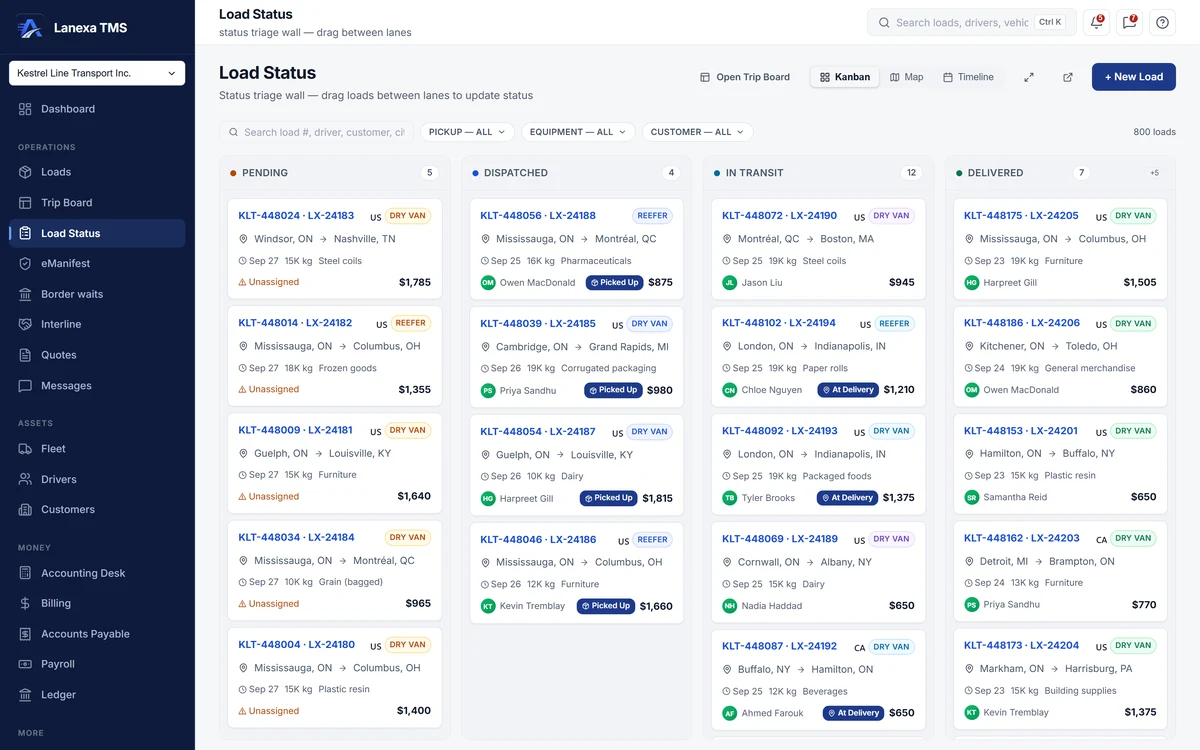
- Drag a load to its next status
- The same loads on a map or a timeline
What it does
Kanban by stage
Four lanes — pending, dispatched, in transit, delivered — cover the ten statuses a load moves through. Drag a card forward or click its one next step: picked up, at delivery, delivered. Each card shows the probill, lane, pickup date, weight and driver, flags unassigned work, and shows an INTERLINE badge when a partner hauls it.
Delivered writes the invoice
Marking a load delivered stamps the delivery and writes a draft invoice in one transaction — tax from the destination province, your customer's fuel surcharge applied — or records exactly why it skipped, such as a missing POD. The delivery itself is never held up by paperwork.
A map that does not guess
One marker per load, coloured by urgency: act now, watch, or fine. A solid dot is a position reported by a connected ELD; a hollow ring is where the load is planned to be. A load in transit with no device sits at its origin, not at an invented midpoint, and a chip counts the loads that cannot be mapped.
What is due when
The Timeline lens lays each load out as a bar from pickup to delivery in a driver-by-day grid, with team loads in both drivers' rows and unassigned work in its own row at the bottom — so a gap or a double-up in a driver's week shows at a glance.
Every change confirmed and recorded
Every status change asks for confirmation. Moving a load backwards more than five minutes after its last change needs an explicit override, three changes in two minutes draws a warning, and truck-ordered-not-used is refused once a load has been picked up. Each change is written to the load's history with who made it.
Status cannot outrun the books
A load cannot be dispatched with no customer attached, marked invoiced until an invoice exists, or marked paid until that invoice is paid. Delivering a farmed-out load raises the partner carrier's bill, and delivering the last leg of a multi-leg shipment completes it.
The detail, when you want it
Everything live in Load Status12
- Kanban, map and timeline over one filtered set of loads
- Search by load number, probill, driver, customer or city
- Filter by pickup window, equipment and customer
- The Delivered lane shows the last 48 hours, the rest one click away
- Focus one lane to read a crowded column
- Full-screen mode for a wall display
- Map clusters take the worst urgency inside them
- A map side list of exactly what is in view, worst first
- The planned lane drawn for the selected load
- Create a new load without leaving the wall
- Copy a public tracking link from the load
- Other dispatchers' changes appear without a refresh
Which plan includes itThe Load Status wall — kanban, map and timeline — is on Start and up.
On Solo, each load moves through its statuses, and is marked delivered, from the load's own record. Reported map positions need a connected Samsara or Geotab ELD, which is a Fleet feature. Compare plans
How we count65 live capabilities of 76 catalogued.
Each capability is one control, field, tile, column or disclosed number, counted one by one. The registry
Why four lanes for ten statuses?
The wall is for freight in motion. At pickup and at delivery sit inside the In Transit lane, and invoiced, paid, cancelled and truck-ordered-not-used loads leave the Kanban, though they still appear on the map and timeline.
A load only reaches invoiced or paid once Billing holds the matching invoice.
What happens when I mark a load delivered?
One transaction stamps the delivery and writes a draft invoice with tax from the destination province and your customer's fuel surcharge.
If the customer requires a POD or other documents that are not on file, the delivery still records, no invoice is written, and the activity log says what is missing. If no tax rule matches, the invoice charges zero and says so rather than guessing.
Does the map show live GPS?
Yes, on Fleet. A connected Samsara or Geotab account supplies reported positions, drawn as solid dots.
Every other load is drawn as a hollow ring at a planned position — its origin until it is delivered, even while in transit, and its destination after — never at an invented midpoint.