FleetEvery unit, where it was last seen, and what it earns.
Fleet is the register of every power unit, trailer and yard you run from, with the dates that keep each unit legal on the road.
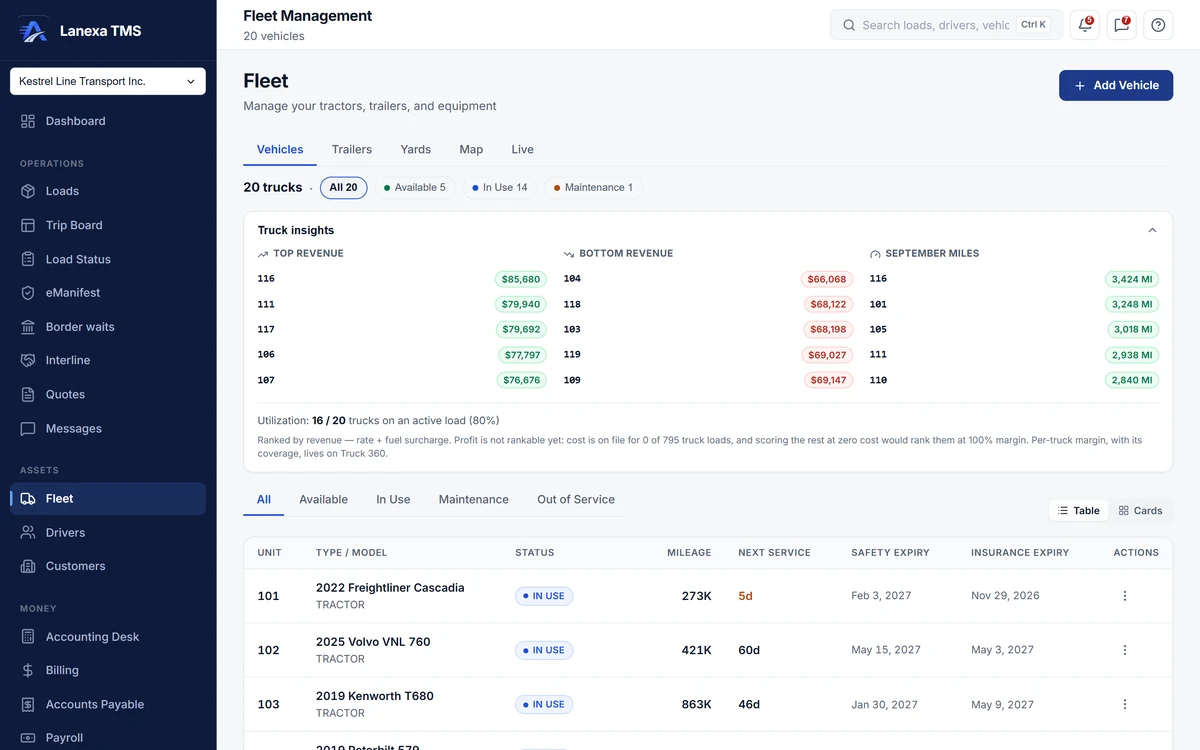
- What each truck earns, ranked
What it does
One register, three lists
Trucks with VIN, plate, IFTA decal and account, IRP plate, CVOR and the DOT annual inspection, its expiry filled in twelve months out. Trailers with ownership or lease, reefer setpoint, and inspection, plate and insurance dates. Yards, docks, terminals and customer sites with a geofence radius, dock doors and hours.
Position as evidence
Where a unit is comes from recorded movements — a completed stop, a hook or drop, or a dispatcher's relocation with a note — never from a typed field. Each entry keeps its source; history locks after 48 hours, and a correction is added beside the original instead of writing over it.
Find the trailer that is not earning
The idling report ranks every trailer by days since its last drop or movement, with the load still sitting in it. The five longest-idle show on the Trailers tab, and a trailer idle for 30 days raises an alert overnight — marked as still loaded when it is.
Expiry alerts before the scale house
A truck whose insurance or safety certificate expires within 30 days raises an alert to your administrators in the app and by email, once a day per unit — so you hear about a lapse before a roadside inspection does.
What each truck earns and costs
The Vehicles tab ranks trucks by revenue and by this month's miles and shows how many are on a load. Truck 360 adds cost, margin and cost per mile, using the monthly payment, insurance and plates you enter per truck; where the inputs are thin it shows a dash and names what is missing, never a false zero.
GPS from your ELD, on Fleet
On the Fleet plan, connect your Samsara or Geotab account in Settings, and device positions feed the Live tab and the same movement history.
The detail, when you want it
Everything live in Fleet12
- Five views: vehicles, trailers, yards, map and live
- Status count chips that double as filters
- A dense table or cards, remembered per browser
- Relocate a truck or trailer to a yard or a typed place, with a note
- A fleet map with one marker per place, sized by count
- Lifetime movement history on every truck and trailer
- Retire a truck without breaking its loads, trips or fuel receipts
- Next-service date turns amber within seven days
- Reefer make, model, setpoint and fuel level on reefer trailers
- Trailer 360: last known location, hooked-to truck, loaded or empty
- Custom fields on vehicles
- A warning from 80% of your plan's truck limit
Which plan includes itTrucks and their records, Truck 360 costing and the expiry alerts are on every plan — one truck on Solo, up to nine on Start, unlimited on Fleet and Enterprise — and trailers never count toward the limit.
Trailers, yards, positions, the fleet map and movement history are Start and up. Connecting a Samsara or Geotab account for GPS is Fleet and up. Compare plans
How we count71 live capabilities of 93 catalogued.
Each capability is one control, field, tile, column or disclosed number, counted one by one. The registry
Does Lanexa show live GPS?
Yes, on Fleet and up, from a connected Samsara or Geotab account.
Without an ELD, a unit's position comes from the stops your dispatchers complete and any relocation they record, and it is shown as last known rather than live.
Do trailers count toward my plan's truck limit?
No. Only power units count: one on Solo, up to nine on Start, no limit on Fleet and Enterprise.
You see a warning from 80% of the limit, and retiring a truck is never refused. On Fleet, the per-truck price counts power units on at least one load that month — never trailers.