ComplianceThe records an auditor asks for.
Compliance is the module a carrier is audited on.
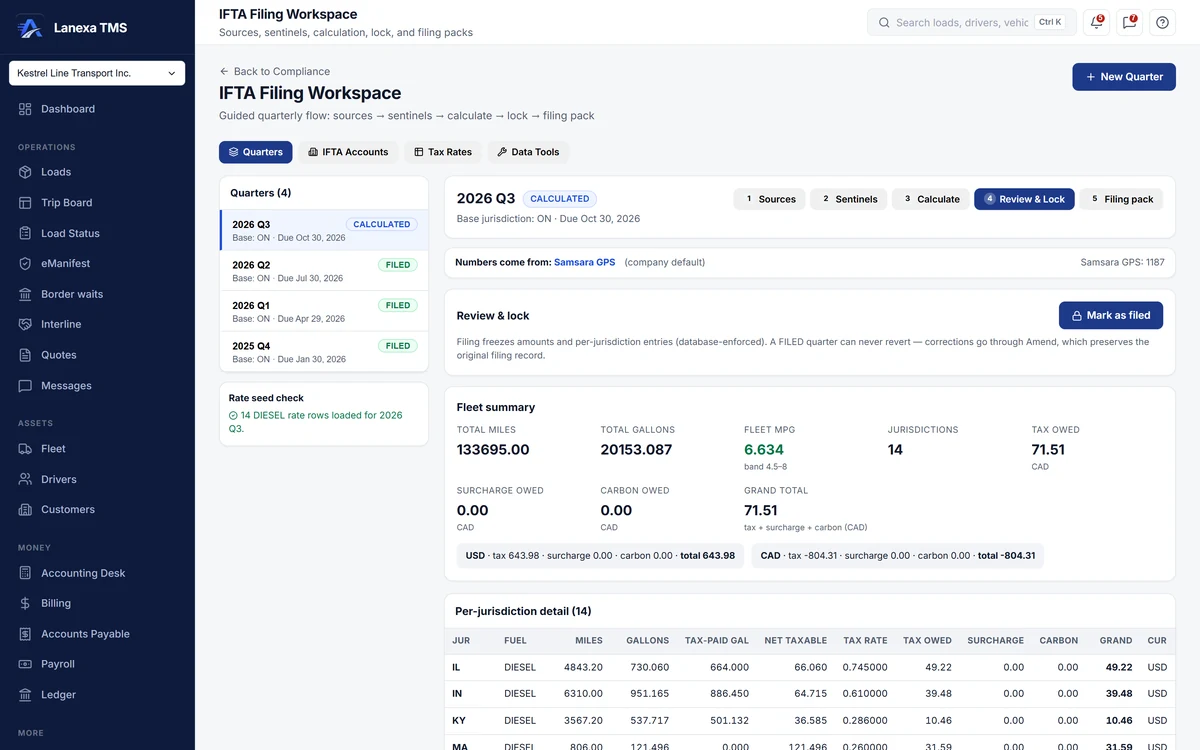
- Five steps from miles to the filing pack
What it does
A full IFTA quarter, start to finish
Five stages: choose the mileage source, run the checks, calculate, review and lock, then export the filing pack. Due dates follow the IFTA calendar, the tax-rate matrix is fetched from IFTA Inc. or pasted in, Canadian per-litre and US per-gallon rates are converted correctly, and surcharge and carbon tax stay separate lines.
Know where every mile came from
Mileage can come from your recorded routes or manual entry on every plan; PC*MILER on your own key adds a source on Start and up, and distance from a connected ELD on Fleet. Compare sources side by side with a variance column, see at every stage which one the numbers came from, and be warned before adding sources together would double-count miles.
Checks before you file
Each quarter is checked for fuel bought where no miles were recorded, miles with no fuel receipts, a fleet MPG outside a plausible band, trips with no located stops, and unverified receipts. The checks advise rather than block, and every finding carries into the Audit-Armor report.
Filed means frozen
Marking a quarter filed freezes its amounts. An amendment asks why, and writes the reason and the pre-amendment totals into the quarter's notes. Exports include the quarterly return, the Audit-Armor report and a per-account filing pack, as CSV or as a PDF on your letterhead.
Incidents and the testing clock
Record a crash with its injuries, police report, insurer and claim, and attach evidence. Live countdowns show the post-accident alcohol and drug testing windows of 8 and 32 hours, and each accident is ruled onto or off the three-year DOT accident register, which exports as CSV or PDF.
Driver files and inspections
Keep each driver's qualification file as a checklist with renewal dates, log previous-employer inquiries against their 30-day clock, and see every licence, medical, FAST card and travel document due to expire. Record roadside inspections with violations by CSA BASIC and DataQ status, and keep DVIR records for trucks and trailers.
The detail, when you want it
Everything live in Compliance12
- Several IFTA accounts per company, each with its own trucks
- A per-quarter mileage source that overrides the company default
- Fuel receipts verified one by one, with an option to leave unverified fuel out
- A preview of the calculation before anything is saved
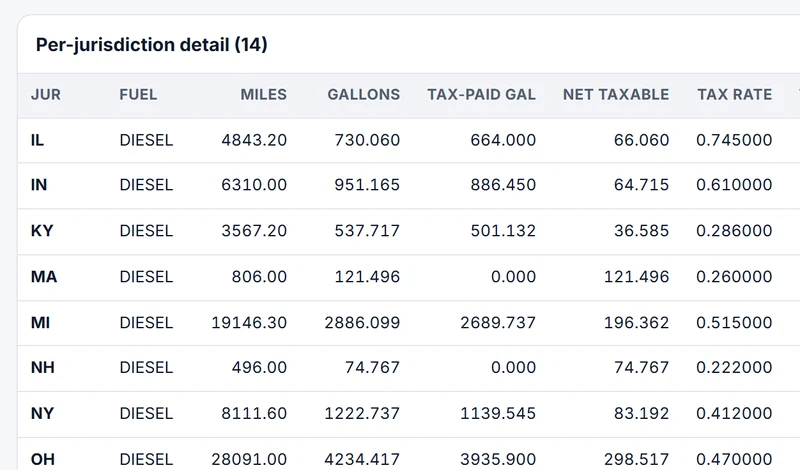
- A per-jurisdiction table of miles, gallons, tax, surcharge and carbon
- Totals kept per currency, beside the converted figure
- Tax-rate periods tagged with where the rates came from
- A written statement in every export that nothing has been filed
- The DOT accident register exportable even for an empty period
- Previous-employer inquiries with a live 30-day clock
- A credential expiry board for licences, medicals, travel documents, FAST cards and TDG
- An Ontario facility-audit profile showing where a file falls short
Which plan includes itThe complete IFTA workspace — quarters, mileage sources and manual entry, IFTA accounts, tax-rate tables, the filing pack and the Audit-Armor report — is on every plan, including Solo.
PC*MILER mileage on your own key is on Start and up, and distance from a connected ELD is on Fleet. Incidents, the DOT accident register, driver qualification files, inspection and DVIR records and the safety queue are on Start and up. Compare plans
How we count342 live capabilities of 386 catalogued.
Each capability is one control, field, tile, column or disclosed number, counted one by one. The registry
Is IFTA included on the Solo plan?
Yes. The complete quarterly fuel-tax workspace is on every plan, including Solo: quarters, mileage sources and manual entry, receipt verification, tax-rate tables, the quarterly return, the filing pack and the Audit-Armor report.
Fuel tax is never held back to push an upgrade.
Where do the IFTA miles come from?
You choose, for the company and for each quarter.
Miles can come from your recorded routes or manual entry on every plan, from PC*MILER on your own key on Start and up, or from a connected ELD on Fleet. The sources sit side by side with a variance column, the chosen one is shown at every stage, and Lanexa warns you before adding sources together would double-count miles.
Does Lanexa file my IFTA return?
No. No jurisdiction offers system-to-system IFTA filing, so nothing is submitted from Lanexa.
You get a ready-to-file quarterly return, a per-account filing pack and the Audit-Armor report, and you enter the return in your base jurisdiction's portal.