DashboardWhat slipped through a crack, on the first screen.
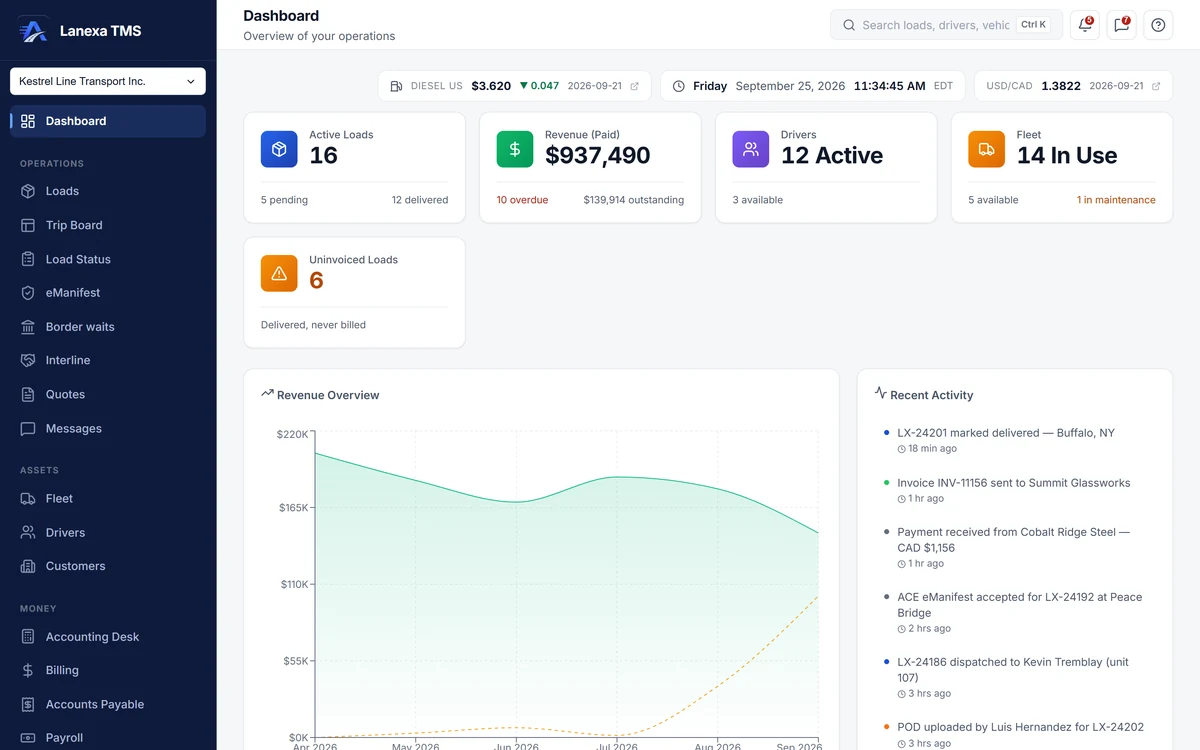
The Dashboard is the screen a carrier opens first every morning: are we moving, are we getting paid, is anything about to lapse, has anything fallen through a crack.
What it does
Money you forgot to bill
The Uninvoiced Loads tile counts delivered work that was never invoiced and turns amber when there is any. For anyone whose role can open Billing, it links straight to the list that fixes it.
Paperwork before it costs you
The Missing Documents radar counts loads whose proof of delivery is late or whose billed detention or lumper charge has no evidence, shows the worst three and links to the full worklist — the same engine the Documents module uses, so the count and the list agree.
Nothing lapses quietly
Driver licences and medicals, truck insurance and safety certificates due within 30 days — red under 15 — plus the company's bond, SCAC and insurance renewals on a 90, 60, 30 and 7-day ladder, with an alert when a renewal date was never entered.
The road outside
Live CBP and CBSA commercial booth waits at your home crossings, refreshed every 30 minutes; storm warnings from the US National Weather Service and Environment Canada for where you are; this week's US diesel index; and today's Bank of Canada CAD/USD rate.
A home page for each job
Accounting roles land on money in and money out, Safety on accidents, credentials and inspections, a driver on their own loads, documents and pay, and a Solo operator on Today. Each person can choose where they land, per company.
Today, for a one-truck operator
What is on the road now; what you are owed — delivered-but-unbilled and unpaid in one list; fuel receipts still to verify; anything expiring in the next 60 days; and earned per mile against cost per mile once your miles and the truck's monthly fixed costs are entered.
The detail, when you want it
Everything live in Dashboard12
- Active loads, with pending and delivered counts
- Paid revenue in your home currency, overdue invoices and open receivables
- Revenue and receivables masked for roles without rate visibility
- Drivers active and available; trucks in use, available and in maintenance
- Paid versus outstanding revenue by month
- The ten newest events in the company, updating live
- The five newest loads, with a Create a load prompt when there are none
- A setup checklist that ticks itself as each step is really done
- Overdue invoices aged 1–30, 31–60, 61–90 and 90+ on the Accounting home
- Carrier bills above the rate confirmation flagged on the Accounting home
- Post-accident alcohol and drug test clocks on the Safety home
- The page updates itself as loads, drivers, trucks and invoices change
Which plan includes itThe operations dashboard, the border-wait, weather, diesel and exchange-rate strip, and the Today home are on every plan, including Solo.
The Safety home is on Start and up. Hours-of-service warnings appear where a connected Samsara or Geotab ELD, a Fleet feature, reports driving time. Compare plans
How we count102 live capabilities of 109 catalogued.
Each capability is one control, field, tile, column or disclosed number, counted one by one. The registry
What does the Uninvoiced Loads tile count?
Loads that have been marked delivered — or later — with no invoice against them.
It turns amber when there are any, and for anyone whose role can open Billing it links straight to the uninvoiced list.
Does the Dashboard show drivers' hours?
Yes, where a Samsara or Geotab ELD is connected, a Fleet feature.
Driving time comes straight from the device.
Can I get the morning picture by email?
On Fleet and Enterprise, the AI daily brief emails a summary of the business at the hour you choose, in your own timezone, and it does not send twice.
If you belong to several companies you choose one email per company, one email with a section per company, or one combined.