MessagesEvery driver conversation, owned and on the load.
A carrier runs on hundreds of small conversations a day — where are you, the dock is full, send the paperwork.
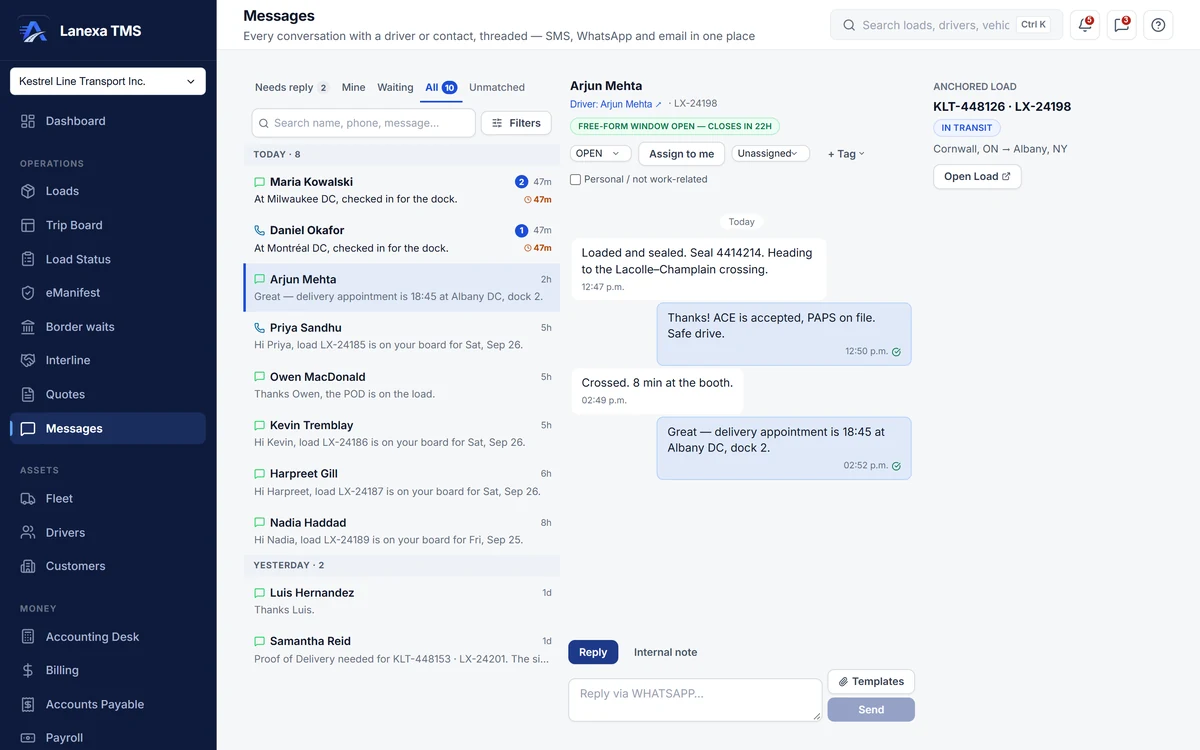
What it does
Sorted by who owes a reply
The inbox opens on Needs reply — conversations where the other person spoke last — with live counts for Needs reply, Mine, Waiting and All, and a waiting clock on each thread that turns red after four hours. Reading a message does not make the work disappear; answering it does.
Texts from your company's own number
On Start and up, drivers are texted from a number that belongs to your company, and their replies come back into the right conversation — matched on the number they wrote to, never guessed across companies. Anything that cannot be matched waits in an Unmatched queue for a person.
WhatsApp for your fleet
An add-on on Start and Fleet, included on Enterprise. Four approved templates — load assigned, load summary with the PDF, document request and status check — carry quick-reply buttons, and a driver's tap opens the 24-hour window for normal conversation. Setup takes 3–5 business days; North American numbers only.
Replies land on the load
A conversation attaches to its load, and messages about a load appear on that load's own timeline. Photos a driver sends in a load's thread are filed against that load and wait in a review queue where someone names them — BOL, POD.
A driver's words, logged if you agree
When a driver writes “running 45 min behind” or reports a breakdown, Lanexa suggests logging it as an exception on the load and shows the words that triggered it. A person decides; nothing is raised automatically.
Alerts that reach someone
Every alert can be acknowledged, snoozed with a written reason, handed to a colleague or resolved. On Fleet, rules decide who hears what, an on-call rota covers nights, unanswered critical alerts escalate, and a phone call can read a critical alert aloud and take a keypress.
The detail, when you want it
Everything live in Messages12
- Search by name, phone number, email or message text
- Filter by channel, status, assignee, tag or unread
- Assign a conversation to yourself or a named colleague
- Tag threads — detention, breakdown, docs needed — or mark one personal
- Internal notes that are never sent, shown as their own cards
- Templates filled from the load: reference, route, pickup date, equipment and driver
- Attach a PDF or photo — it is catalogued in Documents first
- Email from your company's own address on every plan, or from your own domain
- A nudge, never a block, before texting a driver between 9 pm and 7 am
- A warning before a long text bills as several SMS segments
- A resolved conversation reopens when the driver writes again
- The unread count in the header on every page
Which plan includes itThe inbox, driver texting on a company number and inbound replies are on Start and up: 250 texts a month on Start — a soft cap, where sending pauses only after a second month in a row over — and 5,000 fair use on Fleet.
WhatsApp for your fleet is an add-on on Start and Fleet that uses your plan's message allowance; it is included on Enterprise. Solo emails documents out, 50 a month. Compare plans
How we count292 live capabilities of 312 catalogued.
Each capability is one control, field, tile, column or disclosed number, counted one by one. The registry
How does WhatsApp for your fleet work?
It is an add-on on Start and Fleet, and included on Enterprise.
You request it in Settings; Lanexa provisions the number and gets the message templates approved by Meta, which takes 3–5 business days, and nothing is charged until it is live. Drivers receive the load assignment, the load summary PDF, document requests and status checks with quick-reply buttons, and their replies come back into the conversation on the load. North American phone numbers only.
Do photos from drivers file themselves?
They are filed against the load when they arrive in that load's conversation, then wait in a review queue where someone chooses the type — BOL, POD — in a click.
Do drivers need an app?
No. Drivers use what is already on their phone — SMS, or WhatsApp with the add-on — and links that open in the phone's browser.
There is nothing to install.