ReportsThe answers you print, attach and file.
Some questions need a piece of paper: every invoice still owed, sorted by age; a three-year accident register; the delivered loads nobody billed.
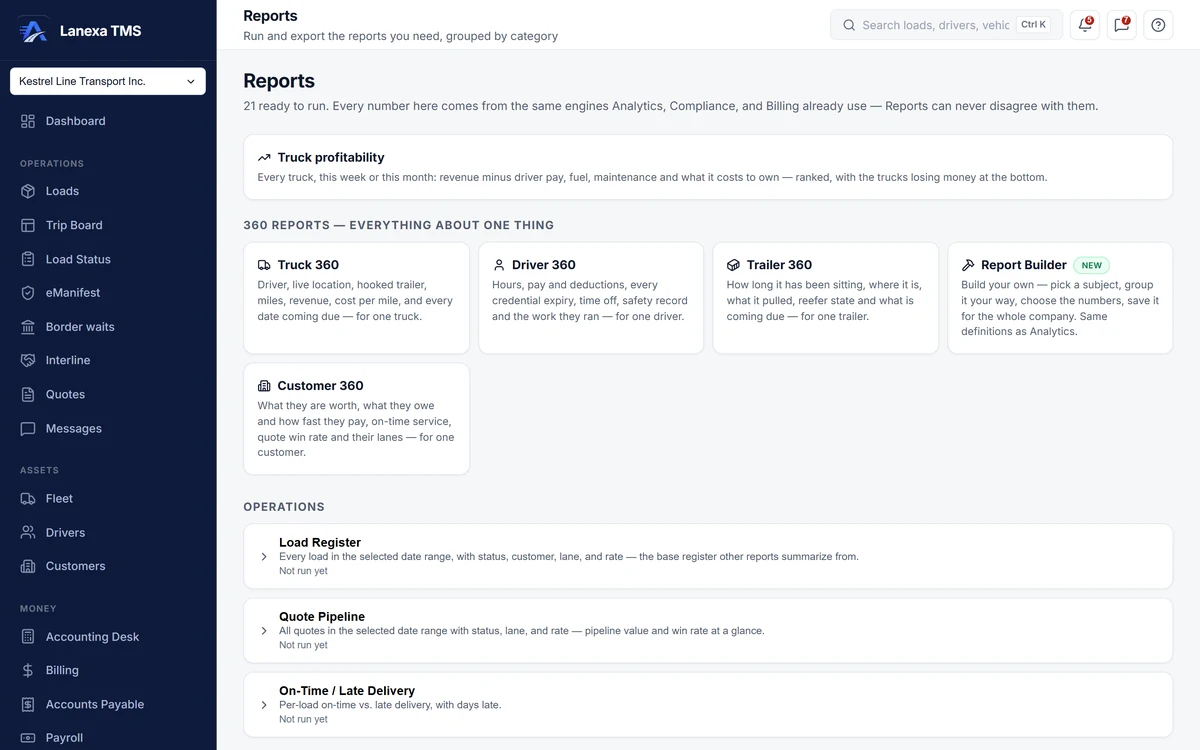
What it does
A catalogue, ready to run
Fixed reports in seven categories — Operations, Revenue, AR/AP, Payroll, Fuel & IFTA, Assets and Compliance. Set the dates, the customer or the driver, run it, check the preview and download it as CSV, Excel, or PDF where the report offers one.
Proof for a fuel-tax audit
IFTA Audit-Armor sets the miles from every mileage source that ran for the quarter side by side, by jurisdiction, with the variance between them, a fuel-economy check and the fuel receipts as evidence — beside the quarterly state-mileage report and a per-account filing pack.
Everything about one thing
Truck 360, Driver 360, Trailer 360 and Customer 360 turn the question around: pick one truck, driver, trailer or customer and read its work, its money and what is coming due on one page. Money is absent, not blurred, for a role without rate visibility.
Build your own, without a spreadsheet
Pick a subject — loads, invoices, quotes, fuel receipts, driver pay, drivers, trucks, credentials or accidents — group it, choose the numbers, filter on values that actually exist, and click any row to see the records behind it. Save it by name and have Lanexa remind you in the app daily, weekly or monthly.
Ask in plain English
On Fleet and Enterprise, Ask Lanexa turns a question such as “revenue by customer, last 90 days” into a report definition and shows how it read you, so a misreading is visible and fixable. The AI never computes a number and never sees your data; the report engine does the arithmetic.
A dash means unknown, never zero
When a measure could not use every record, the report says so in a sentence — how many rows carried the data and why the rest did not. An unknown cell shows a dash with the reason, and a CSV leaves it blank, rather than a made-up 0 a spreadsheet would average as fact.
The detail, when you want it
Everything live in Reports12
- Each report card shows what it found the last time anyone ran it
- “Not run yet” kept apart from “returned nothing”
- A 50-row preview before you download
- CSV and Excel on every report, PDF where offered
- A Customer Statement PDF for one customer
- Uninvoiced Loads — delivered work that was never billed
- AR Aging, Invoices and Carrier Bills registers
- A rolling three-year Accident Register
- Document Compliance per load: required versus present
- Money reports locked for roles without rate visibility, with the reason shown
- The first 50 records behind any builder row, one click away
- Saved reports re-checked before they run, with a warning if something they name has changed
Which plan includes itThe catalogue of fixed reports, including IFTA Audit-Armor, and the four 360 pages are on every plan, including Solo.
The report builder and scheduled report reminders are on Start and up. Ask Lanexa — a plain-English question turned into a governed report — is on Fleet and Enterprise. Compare plans
How we count104 live capabilities of 117 catalogued.
Each capability is one control, field, tile, column or disclosed number, counted one by one. The registry
How does Ask Lanexa answer a question without inventing numbers?
Ask Lanexa, on Fleet and Enterprise, only turns your question into a report definition — the subject, grouping, measures, dates and filters you could have picked by hand — and shows how it read the question so you can correct it.
The report engine then computes every figure. The AI never computes a number and never sees your data, and money measures stay hidden from anyone without rate visibility.
Can a report disagree with Analytics or Billing?
It is built not to. Every figure in Reports comes from the same calculations Analytics, Compliance and Billing use, and when a figure could not use every record it says how many it covered instead of showing a confident total.
What is the IFTA Audit-Armor report?
A Fuel & IFTA report for one filing quarter that lists miles by jurisdiction from every mileage source that ran, with the variance between them, a fuel-economy check and the fuel receipts as evidence.
It is on every plan, including Solo, so you can show how the quarter was built when an auditor asks.